DSGN SAGE
DOXA logo

DOXA Spectrum — 2025

Making automated payroll something Nigerian SMEs can trust

DOXA Spectrum: one place for employers to run payroll, stay compliant with statutory remittance, and see how their teams work.

Role
Lead Designer. I owned the product design end to end: all five modules (payroll, employee records, time and attendance, performance, recognition), the employee mobile app, and the design system behind them.
Team
Product manager, web and mobile engineers, and the founders
Timeline
6 months
Platform
Employer web app and employee mobile app
Tags
HR Tech
SaaS
Design Systems
doxaspectrum.com

01/Problem

When payday fails, the business pays for it

Employers across Africa managed employee data, payroll, statutory remittances, productivity, and benefits across multiple tools and manual processes. For SME owners in Nigeria, that meant employee data spread across spreadsheets, chat apps and paper files, payroll calculated by hand, and constant worry about missing PAYE and pension deadlines.

The cost was concrete: manual errors caused 20% of payroll runs to fail (DOXA support tickets, Mar–Aug 2025, before the redesign). For the business, payroll mistakes drove churn, so reducing them was the goal the design had to serve.

Payroll issues made up 38% of support tickets, and 7 of the 12 customers who cancelled in Q3 2025 named a payroll error as the reason. “Fixed” meant a run that paid on time, with correct deductions, without the employer opening a spreadsheet.

02/Users

We designed for three groups

  1. 01

    Business owners and HR managers who run payroll

  2. 02

    Team leads who oversee attendance and performance

  3. 03

    Employees who want transparent access to their pay, leave and performance

03/Research

What we learned

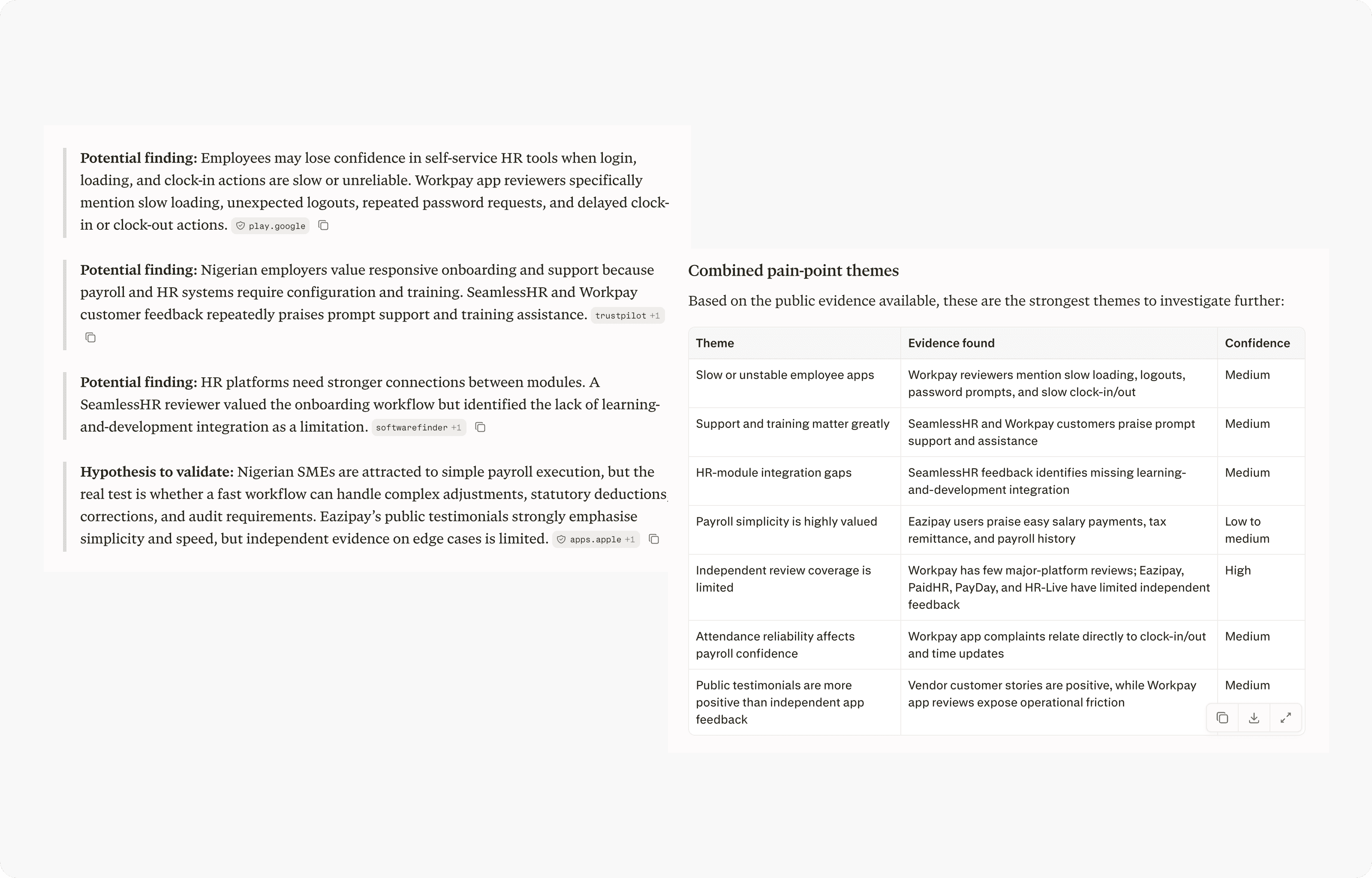
I started with a review of what other payroll and HR platforms got wrong, using public reviews of tools including Workpay, SeamlessHR, Eazipay, PaidHR, PayDay and HR-Live, and rated each theme by how confident the evidence was.

Alongside the review, I interviewed 9 customers and 4 prospects, mostly SME owners and HR managers. Almost all of them re-checked every figure in a spreadsheet before paying staff, even when their current tool did the maths.

Synthesis of public reviews of other HR and payroll platforms, with potential findings, a hypothesis to validate, and themes rated by confidence
Themes from public reviews of other platforms, each rated by how strong the evidence was.

Three findings shaped the product

  1. Finding 01

    Users hesitate to trust automation without clear validation.

    Automating the maths was not enough; the system had to show its working.

  2. Finding 02

    Employee data was fragmented.

    Every downstream error, in payroll, leave or compliance, started with scattered records.

  3. Finding 03

    SME owners struggle with complicated tools.

    Digital literacy varied widely, so power had to come through guided flows, not more options.

Decision 1

Automate the calculations, keep a human checkpoint

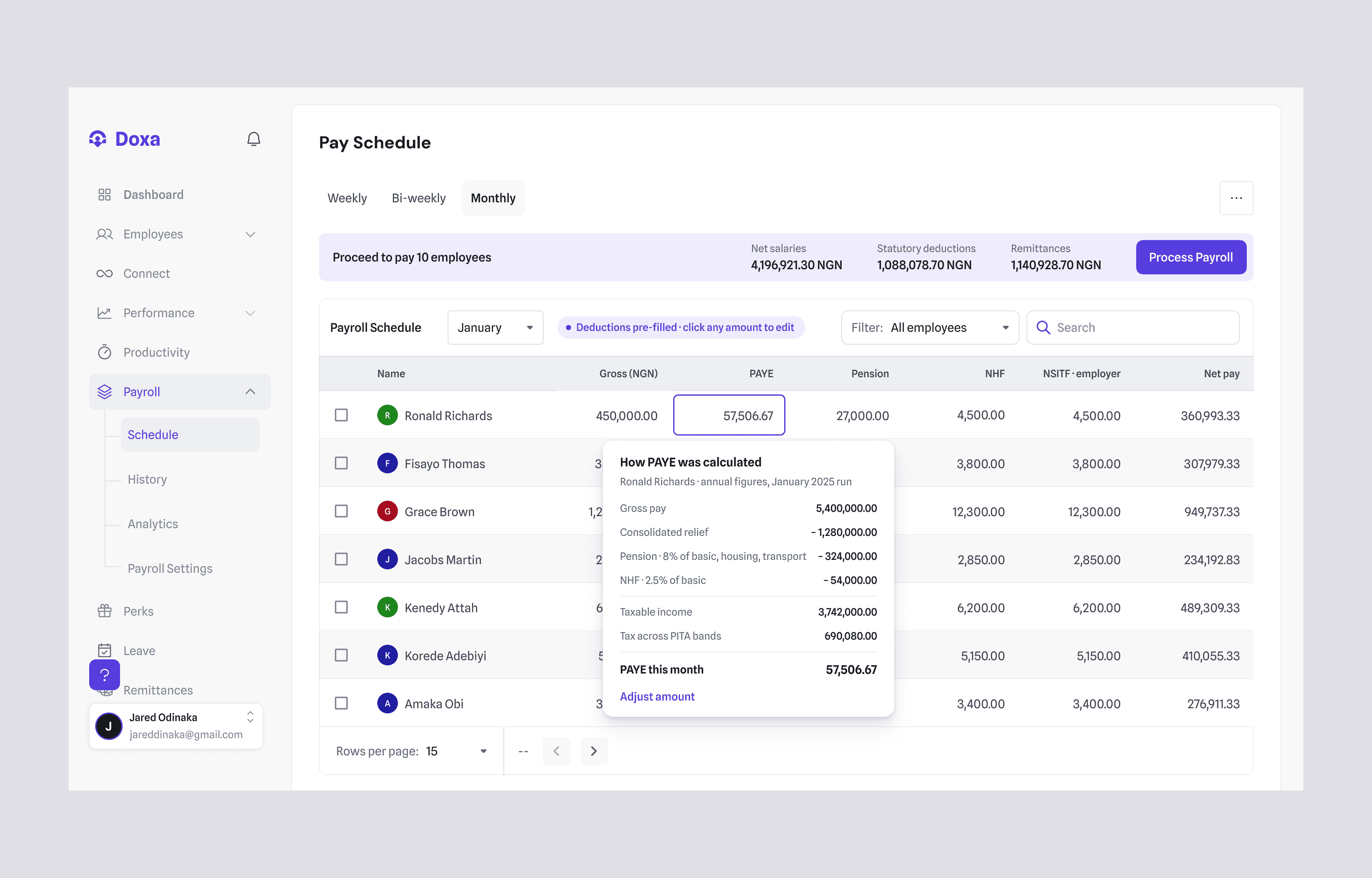
Payroll calculates salaries automatically and pre-fills statutory deductions (PAYE, pensions, NHF, NSITF), with bulk import and automated remittance reminders. But a run does not go straight to execution: it moves from created, through approval, to payday, and the employer can review and edit before it is approved.

We considered two simpler options: fully automatic runs that execute on a schedule, and a single “Confirm payroll” button. Both were faster to build, but both asked employers to trust numbers they could not see, which is exactly what the research said they would not do.

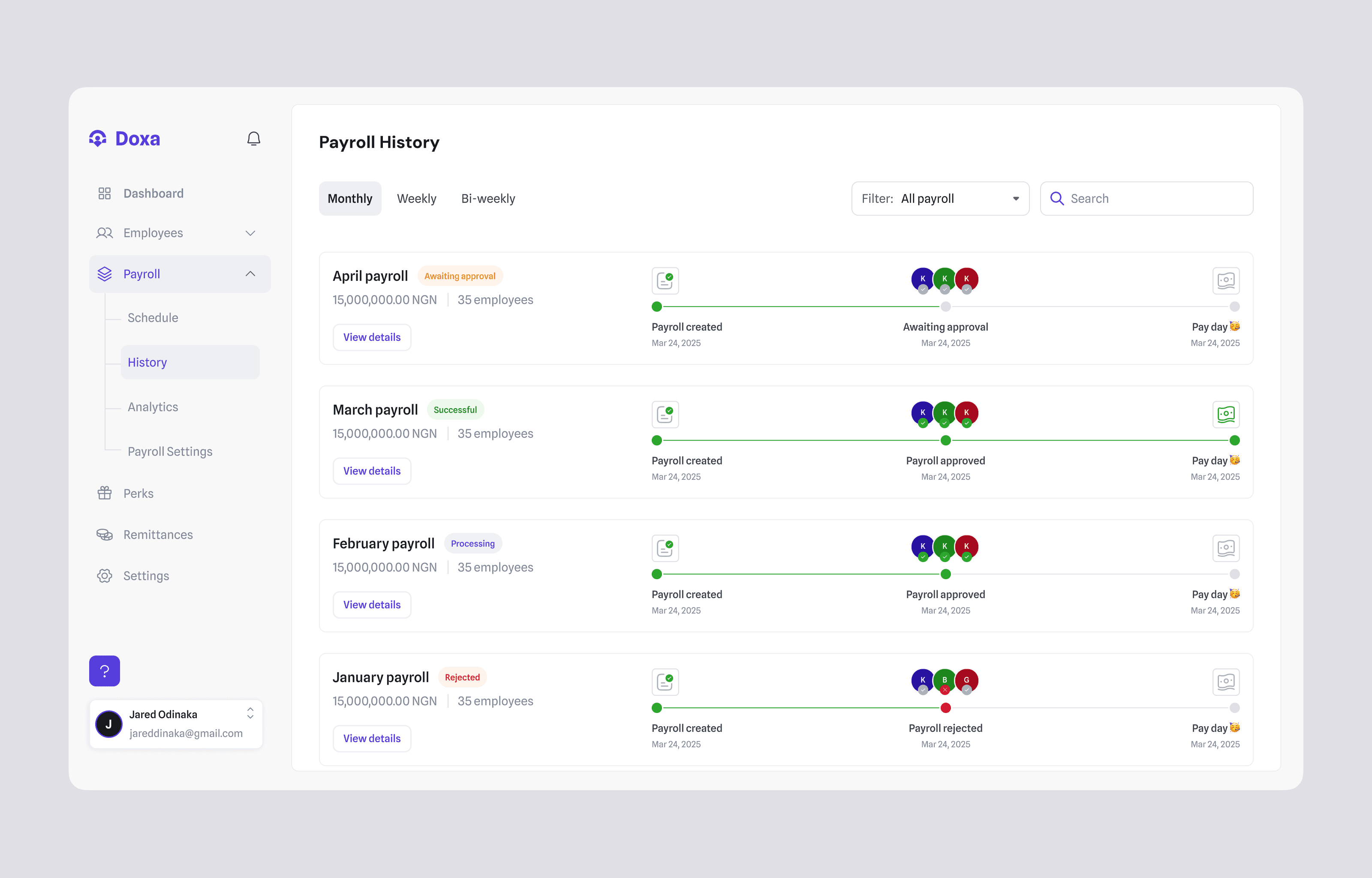
The business owner or an assigned finance approver signs off on each run. A rejected run goes back to whoever created it with the reason attached, stays editable, and shows as Rejected in payroll history, so nothing is paid until it is approved again.
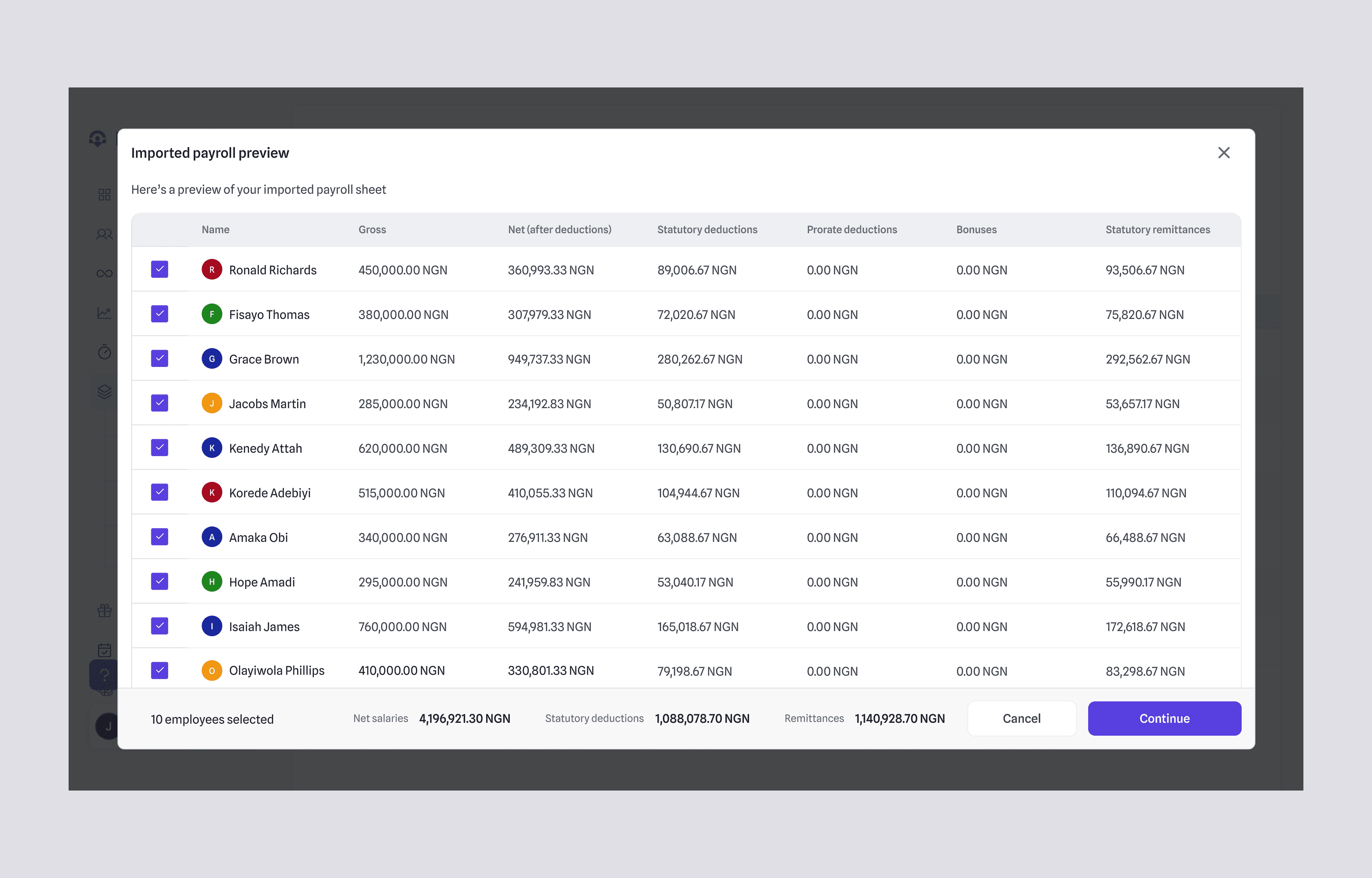
Imported payroll preview listing ten employees, all selected, with gross pay, net pay, statutory deductions and remittances, and the run totals in the footer
Pay schedule table with PAYE, pension, NHF and NSITF pre-filled for each employee, and a popover breaking down how one employee’s PAYE was calculated
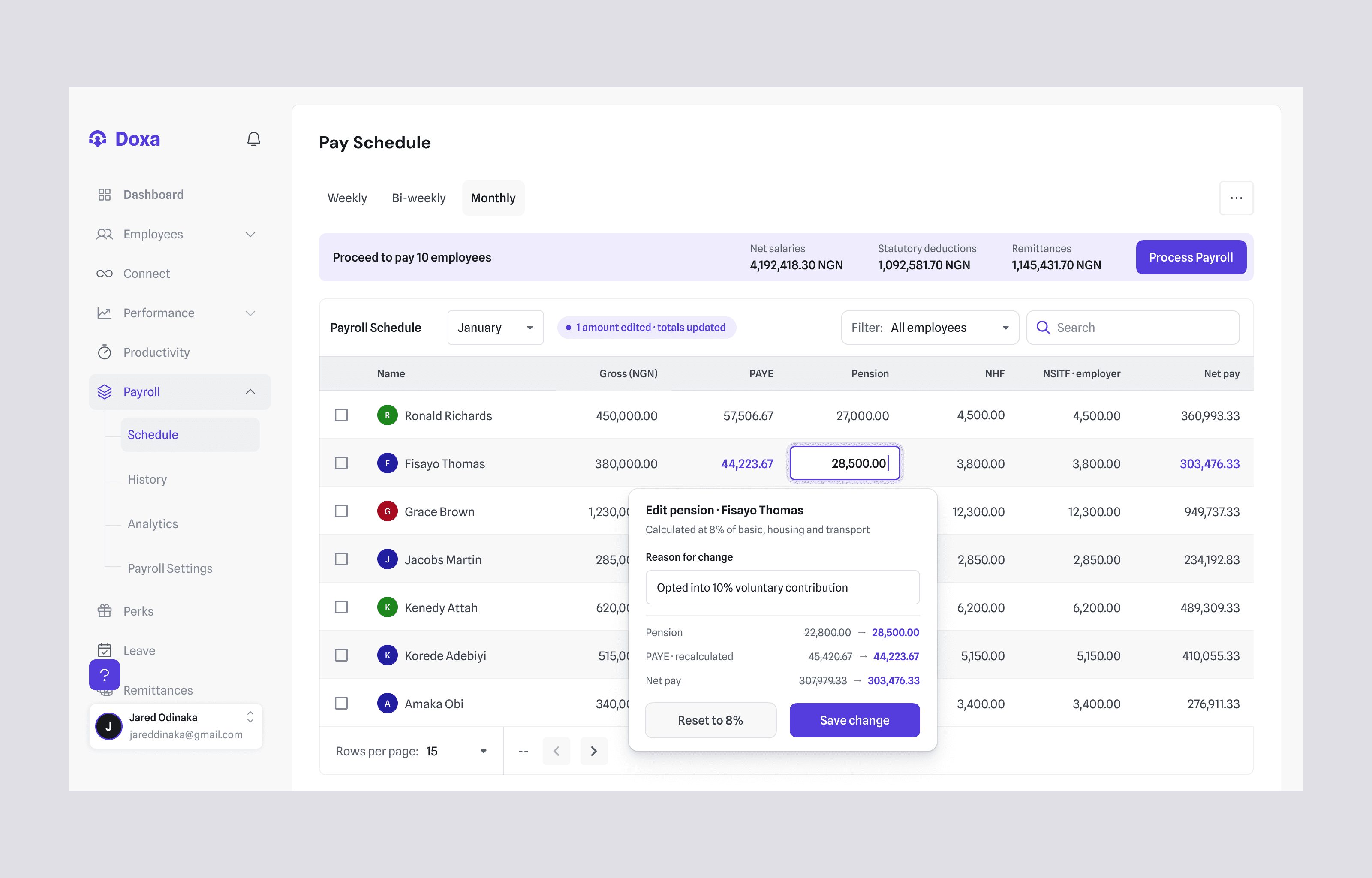
One employee’s pension being edited inline from 22,800 to 28,500, with a reason for the change and the recalculated PAYE and net pay shown before saving
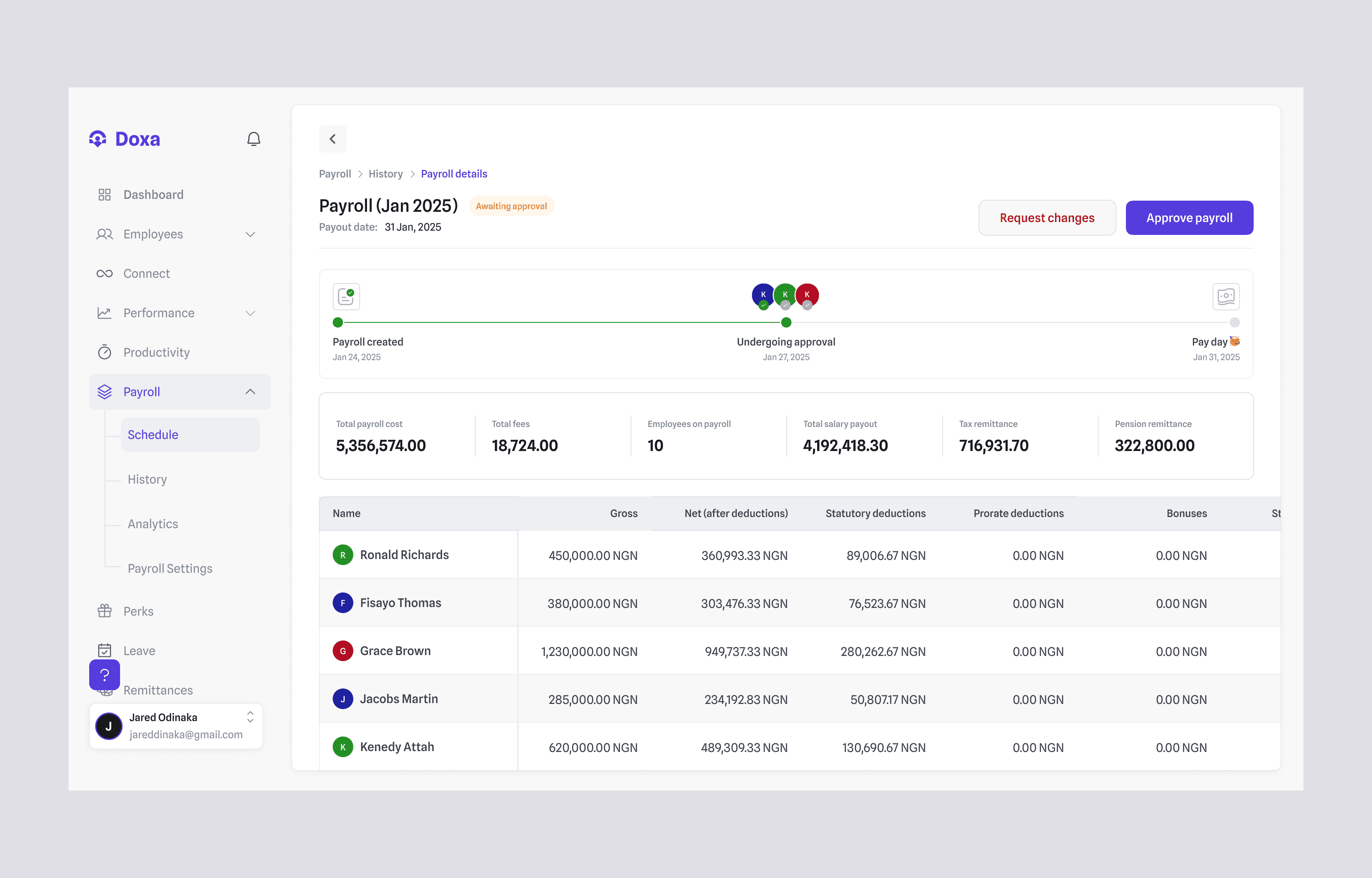
Payroll details awaiting approval, with the created, undergoing approval and pay day stepper, run totals, and Request changes and Approve payroll actions
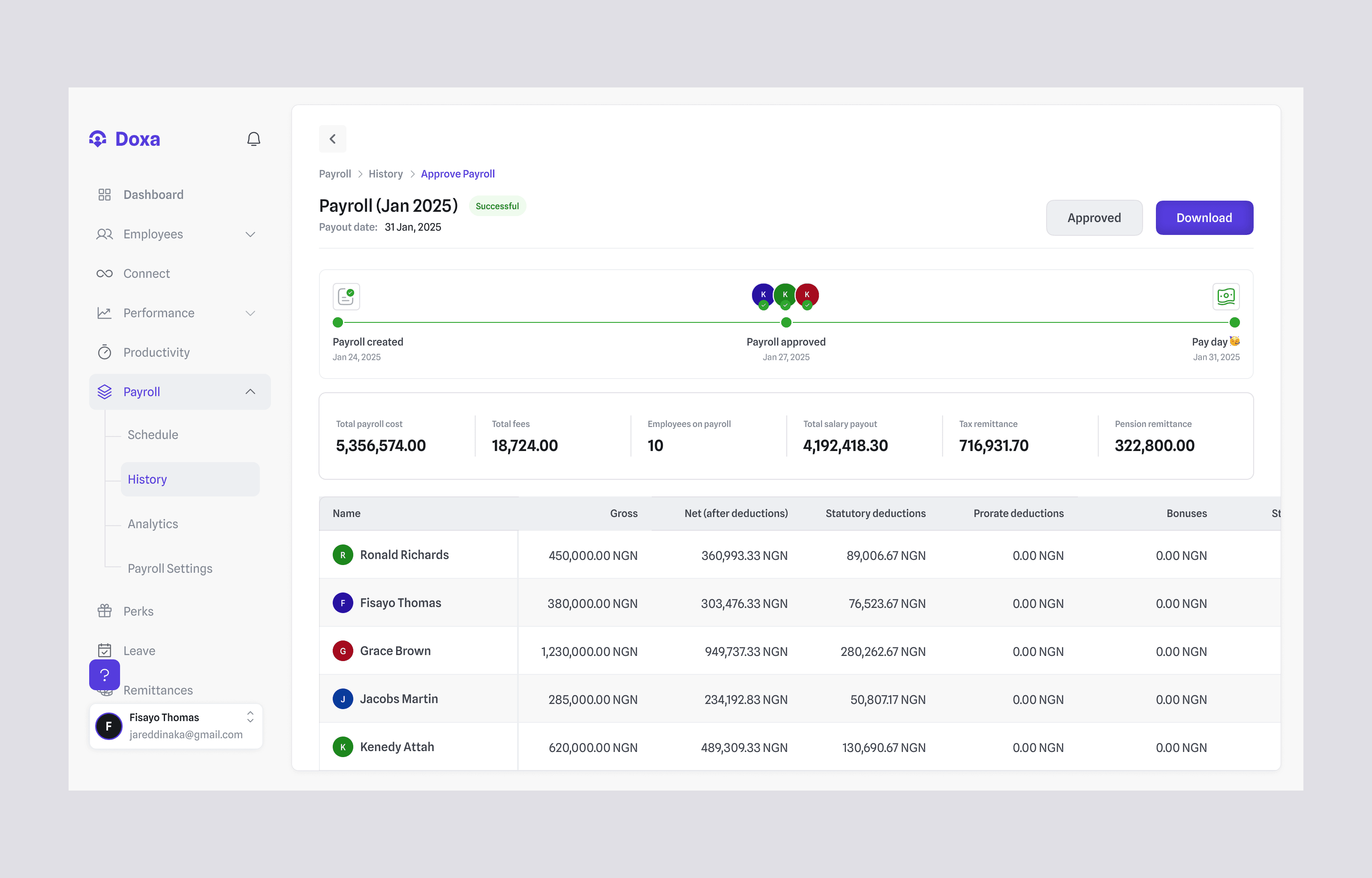
The same payroll marked Successful, with every step of the stepper complete and a Download action
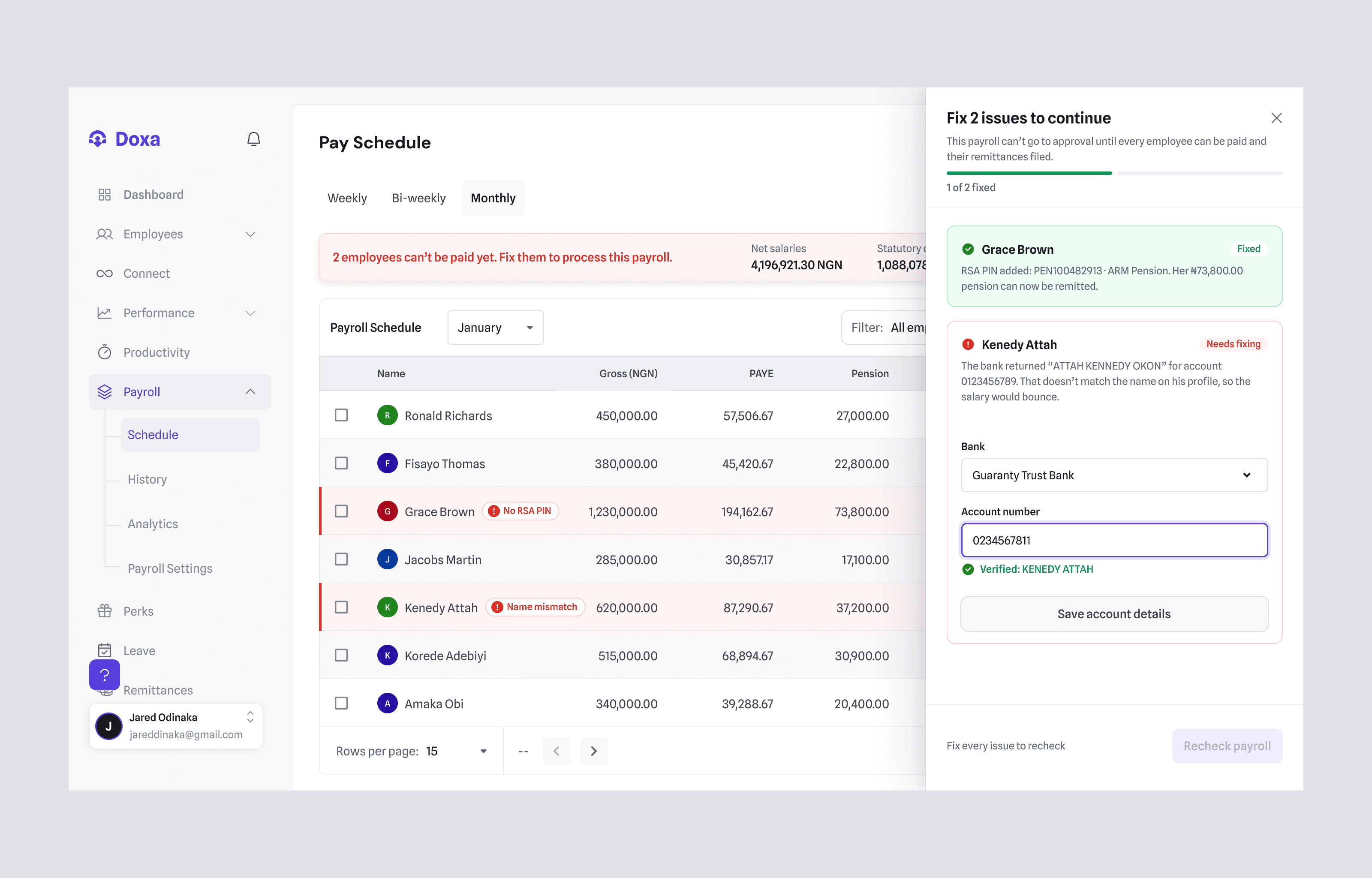
A payroll blocked by validation: two employee rows flagged for a missing RSA PIN and a bank name mismatch, and a side panel where one issue is fixed and the other is being corrected
Payroll history listing monthly runs with awaiting approval, succeeded, processing and rejected states
01/07Import: the employer uploads their payroll sheet and confirms who is in this run before anything is paid.

The editable review step is what got people past their scepticism about automated payroll: users trust automation more when they can see exactly how each deduction is applied.

“I didn’t trust it at first, so I checked every deduction by hand for two months. By month three, I just looked at the review screen and approved.” Amaka O., HR Manager, Lagos logistics company (12 staff)
Decision 2

One employee record as the single source of truth

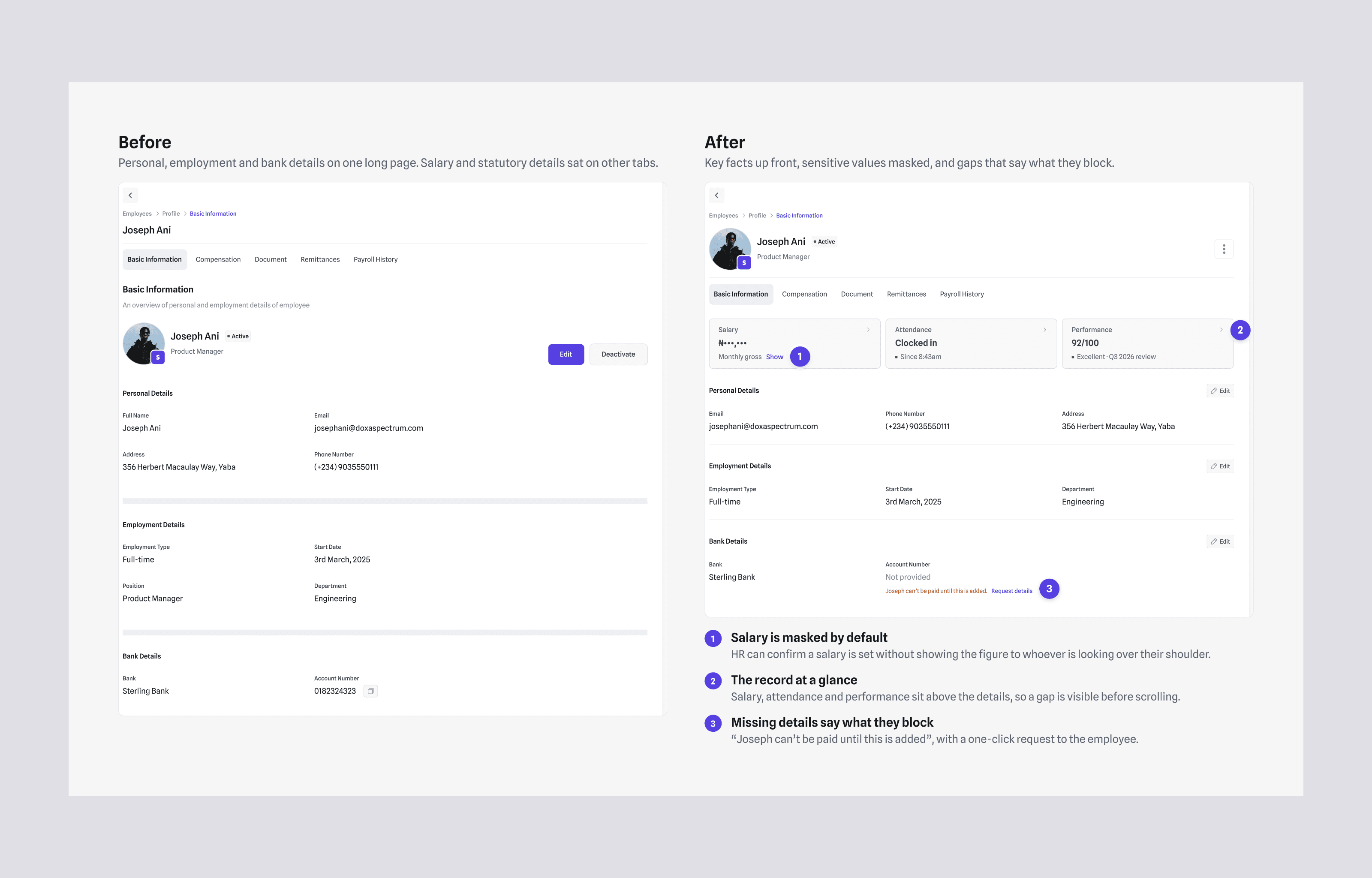
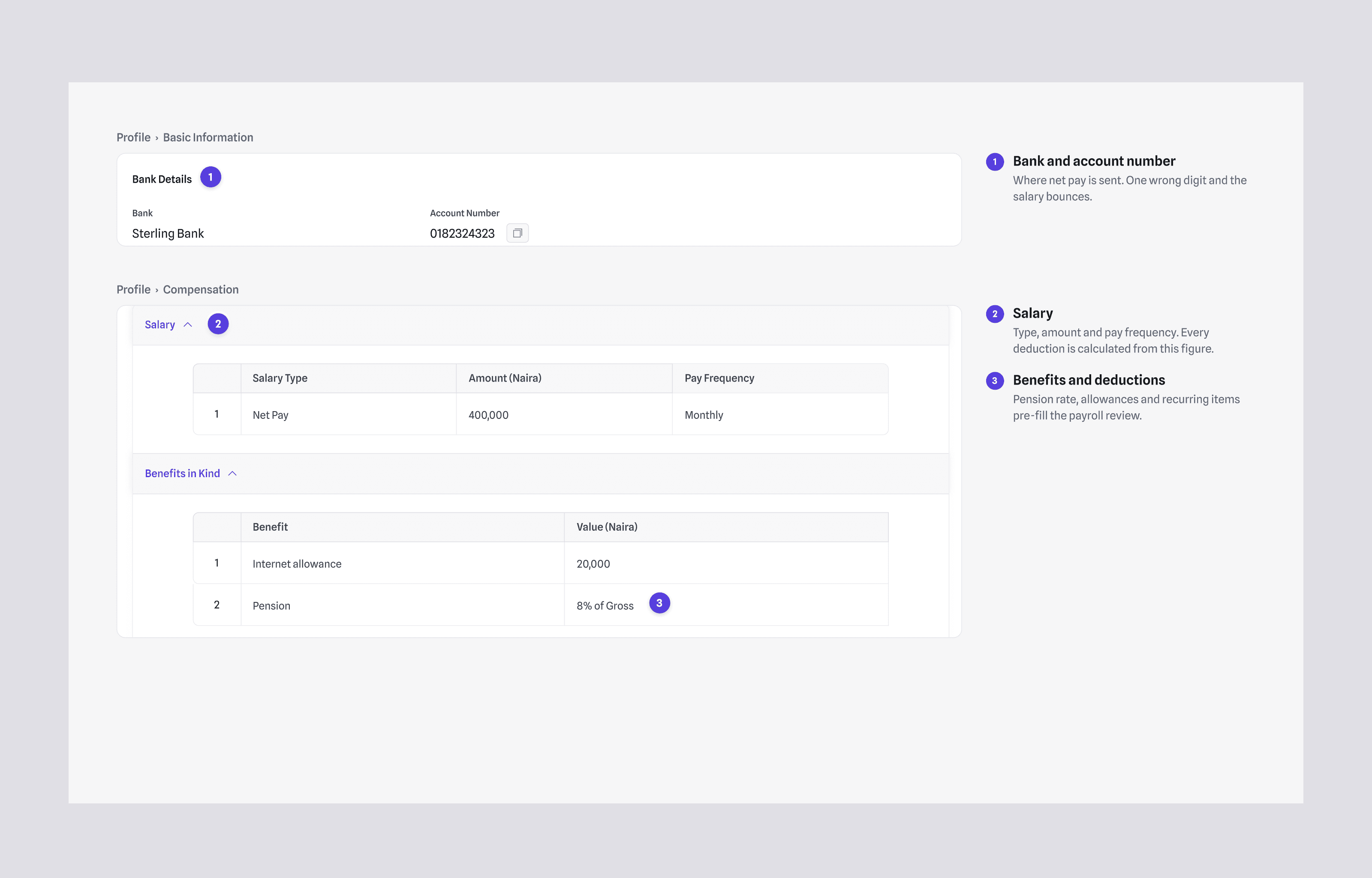
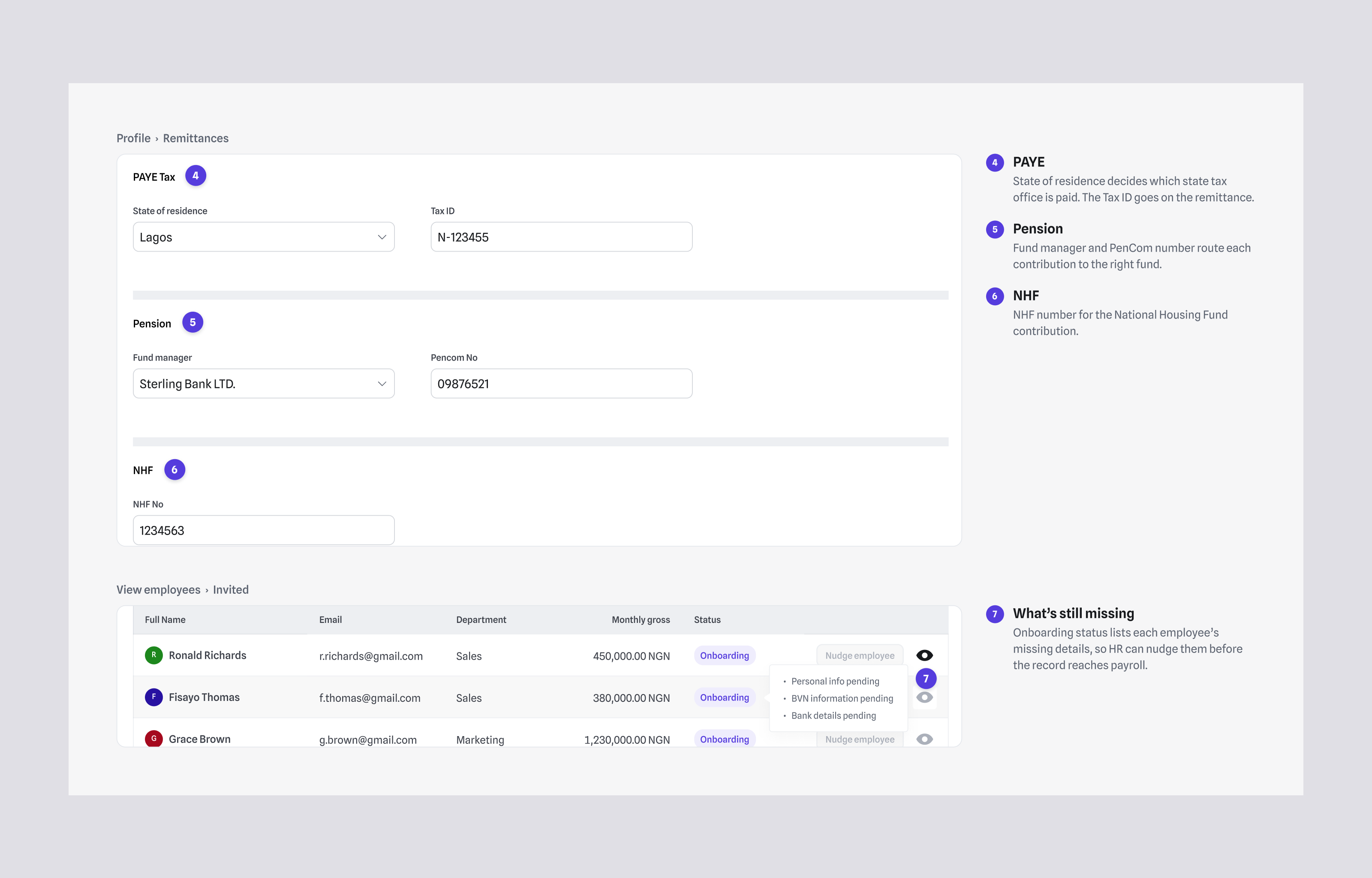
Because errors started with scattered data, the employee profile became the foundation: biodata, role, salary, documents and leave in one record that payroll, leave and performance all read from. Onboarding tracks each invited employee’s status so HR can see whose information is still incomplete before it reaches payroll.

Employee profile tabs with numbered callouts on bank details, salary, pension rate, PAYE, pension and NHF fields, and the onboarding status tooltip listing missing details
Side-by-side of the original employee profile and the redesigned one with salary, attendance and performance cards and a missing account number warning
01/03Payroll reads salary, bank and statutory details from the employee record, and onboarding status shows HR what is still missing before it reaches payroll.

The trade-off was that onboarding took longer, about 3 days instead of same-day for a 30-person company, but payroll errors from missing data dropped to near zero.

Decision 3

Time data that payroll can rely on, from any device

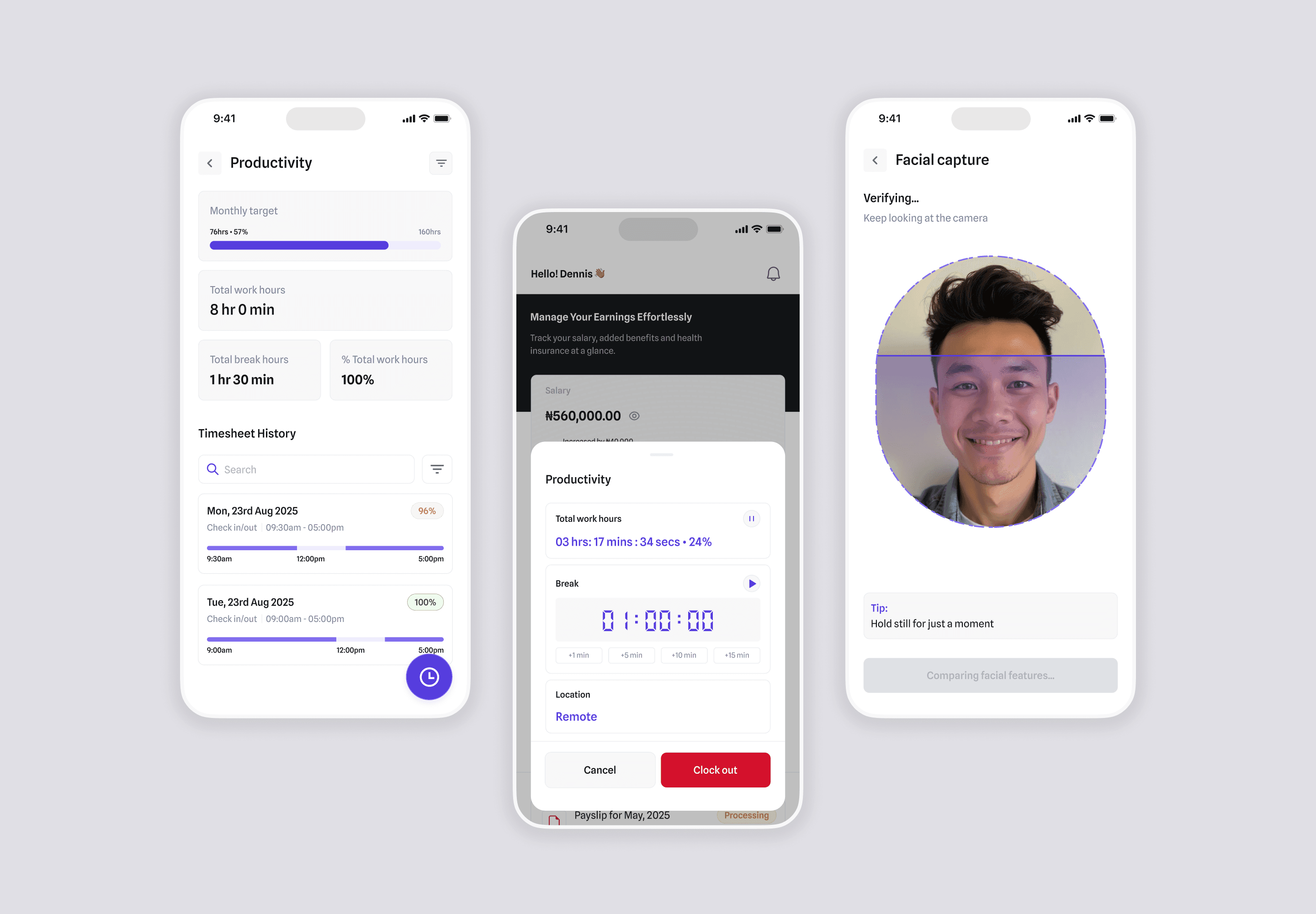
Teams work onsite, remote and hybrid, so attendance had to work across all three and feed clean time data into payroll. Employers see real-time attendance and work activity; employees check in and log hours from their phone, including a facial capture step at check-in; team leads get team-level oversight.

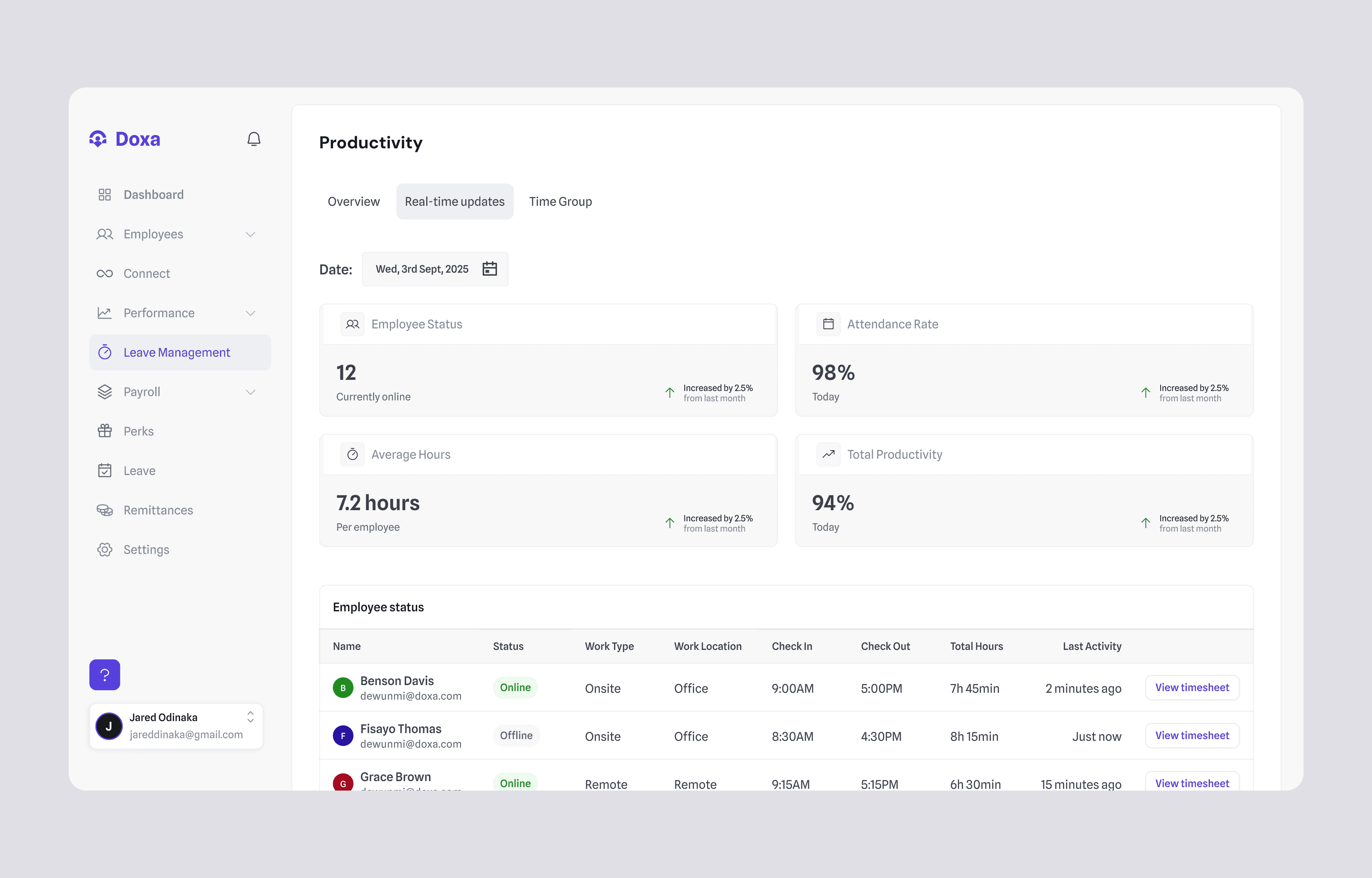
Real-time productivity overview with employees online, attendance rate, average hours, and each employee’s check-in, check-out and work location
Employee mobile screens for timesheet history, checking out, and facial capture at check-in
01/02Employers see who is checked in, where they are working, and their hours, in real time.

Facial capture confirms that the person checking in is the employee, not a colleague checking in on their behalf, which employers told us happened with both onsite and remote teams. We considered GPS-only check-in and manager-approved timesheets: GPS proves where a phone is, not who is holding it, and manual approval moves the work back onto team leads.

Because this is sensitive data, capture happens only at the moment of check-in, and employees are told what is captured and why before they first use it. Activity snapshots follow the same rule. Employees give consent in-app on first check-in and can’t check in without it. Snapshots are taken at check-in only, never during the shift. Images are stored encrypted, visible only to HR admins, and deleted after 60 days. We chose this over continuous tracking after two pilot customers’ staff pushed back.

Beyond payroll

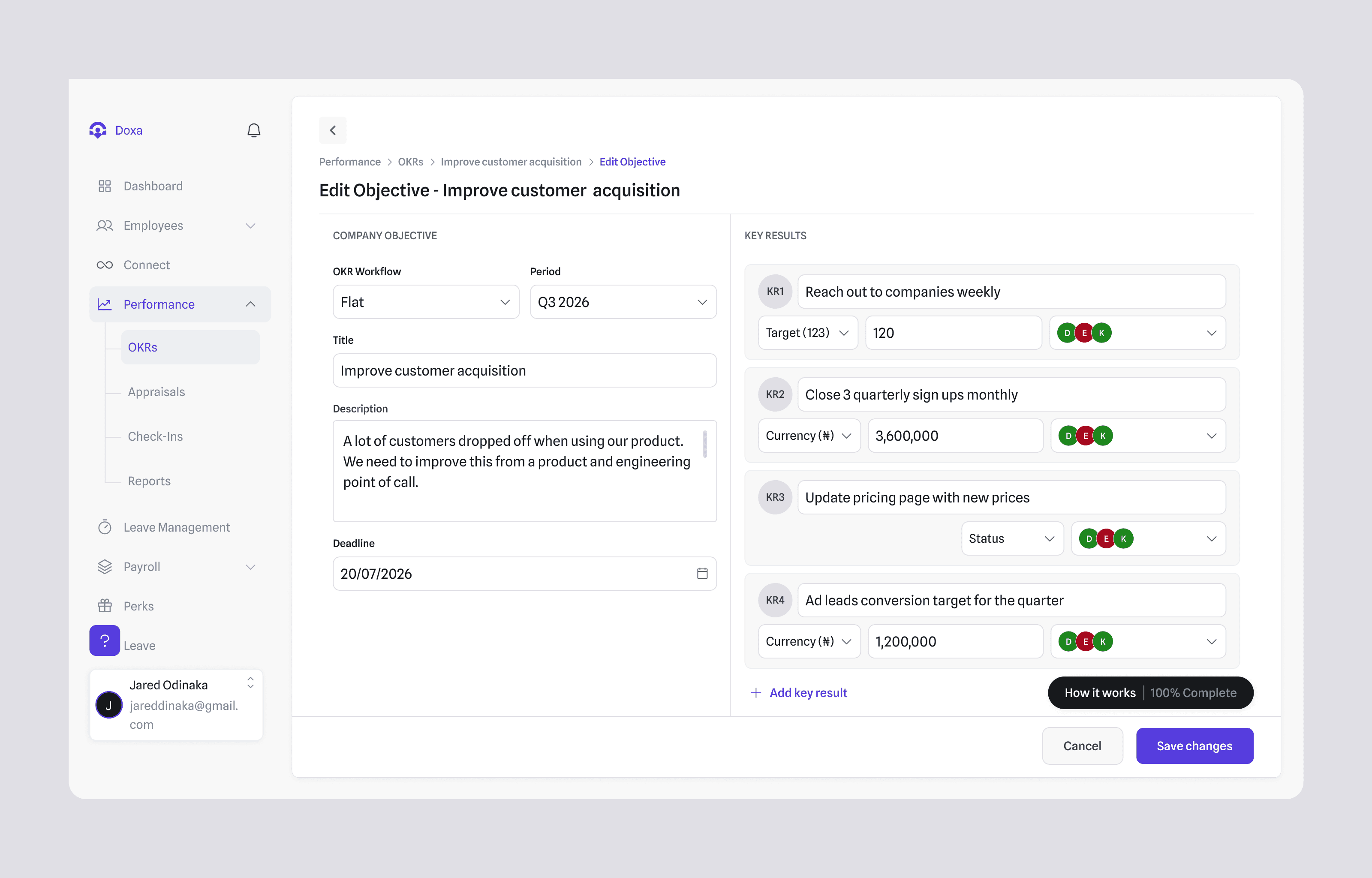
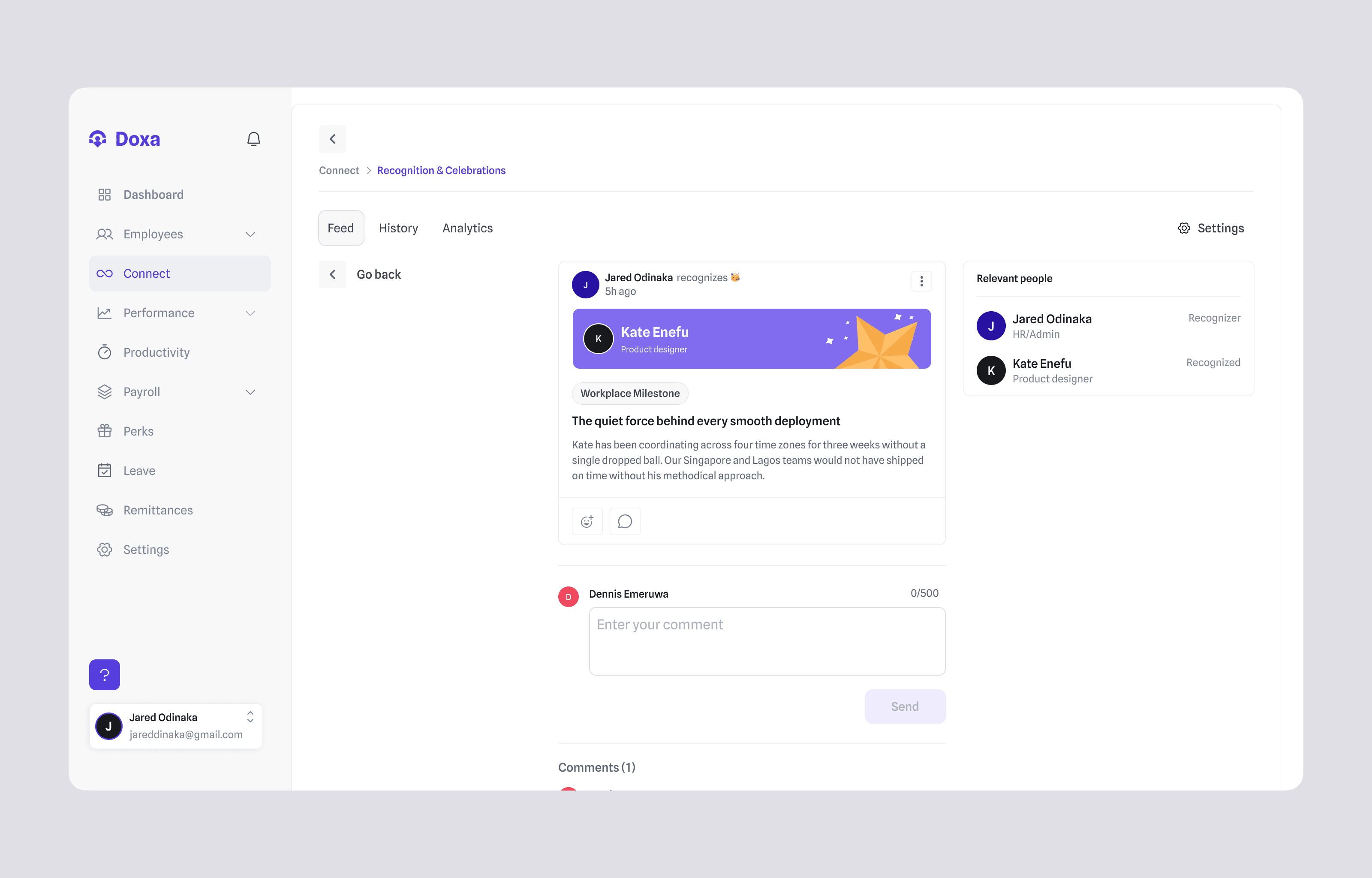
Once payroll and time data were reliable, the same platform extended to performance (OKRs, appraisals and check-ins), recognition tied to company values, and an employee mobile app where staff check in, see their salary and benefits, including health insurance, so staff who are not at a desk all day are not left out.

Edit objective screen with key results, targets and owners
Recognition feed post tying a colleague’s contribution to a workplace milestone, with comments
01/02Objectives and key results live in the same platform as payroll and attendance.

05/Result

The result

Failed payroll runs

Jul–Dec 2025, 400 runs (payroll logs)

2%, from 20%
Statutory compliance

On-time PAYE and pension remittance, 230 remittances over 6 months

100%
Calculation errors

Corrections per month, Q3 vs Q4 2025 (support tickets)

~0, from 31
Adoption

Of active companies use time tracking weekly (Dec 2025)

91%

“Dennis is the rare designer who ships. He led our design vision from scratch.”

SeyiCEO, DOXA Spectrum

06/Learnings

What I learned, and what I’d do differently

  1. 01

    Automation earns trust when it is transparent

    The editable review steps were crucial in overcoming initial scepticism about automated payroll. I would design that review step first next time, not last.

  2. 02

    Simplicity is essential for adoption

    Guided flows, step-by-step onboarding and clear summaries improved adoption among SMEs with varying levels of digital literacy.

  3. 03

    Ship payroll alone first

    I’d have shipped payroll alone first. We launched four modules together, which split engineering time and pushed back the review step our first customers needed most.

Give For Good preview